Select Version of EA Desktop:
The Lists tool is for compiling a list of seismic, file or media items that will be part of a future workflow. The items you organize into a reserve list are stored and become accessible from the Lists, Seismic and Catalog modules.
In the Lists module, you can create a new list of items or access an existing list to continue adding or removing items as needed.
For using a reserve list in the Catalog module, refer to Use a reserve list with cataloging.
After searching in the Seismic module, you can send items from the seismic grid to a new or existing list.
 To add items to a new list...
-
Select the target items in the seismic grid and right-click to open the context menu. Click Create new list.
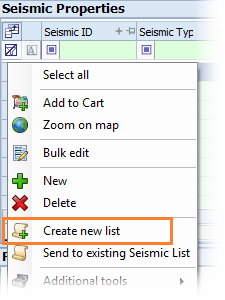
The Create seismic list window opens.
-
In the Create seismic list window, enter the detail for each field:
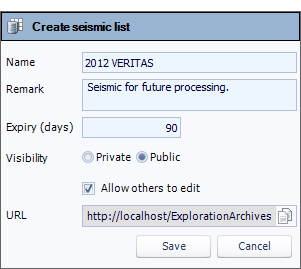
- Name: Enter a relevant name or number.
-
Remark: Enter a description with useful information about the list.
-
Expiry: Enter the number of days to maintain the record as a list. On expiry, the list will delete.
Note:If you don’t want the list to delete, set the Expiry to zero.
-
Visibility: set to Public and Allow others to edit.
-
URL: This field is displays the URL to access the seismic list in EA Browse. Click the Copy icon to copy the URL to your clipboard.
- To save the list and close the window, click Save.
To add records to an existing list...
-
Select the target records in the seismic grid and right-click to open the context menu.
-
Click Send to existing Seismic List. The search window opens.

To find the list, enter search criteria and click Search.
Note: To populate all lists, leave the search criteria blank and click Search. -
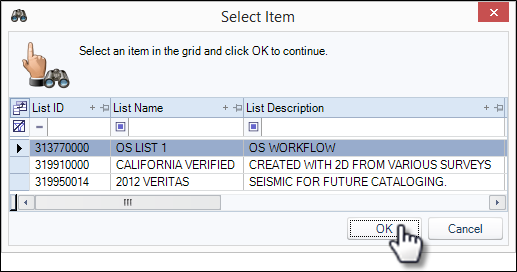
The search results will populate in the Select Item window.
-
Select the target list then click OK. The records will be added to the selected list and the window will close.